(C Programming) C - Data Types, Ops, and Expressions (HISTORY)
C: TYPES, OPERATORS AND EXPRESSIONS (HISTORY)
Data Types, Qualifiers & Storage Allocation
- unlike Python or JS where everything is "object", in C, you have to manage it thoroughly.
- back then,
intandcharwere designed to run super FAST on CPU.intreflects the "natural" size of the host machine's architecture. float&doubleback then were processed using software instead of hardware, so basically its kinda slower, but necessary.- Qualifiers: You can modify
intwithshort,long, andunsigned.unsignedmeans the number is always positive, doubling the maximum limit. - The Year 2038 Problem: UNIX traditionally stored time as a 32-bit
int(seconds since Jan 1, 1970). It will overflow on Jan 19, 2038. Modern systems fixed this by switching to 64-bitlong.
#include <stdio.h>

int main() {
    unsigned int positive_only = 4000000000; // No negative numbers
    long int big_number = 2147483647;

    printf("Unsigned: %u\n", positive_only);
    return 0;
}
Output
Unsigned: 4000000000
Integer Division - Truncating (VNese: tính toán trên số nguyên)
- this is kinda confusing, division in C will (truncate) (VNese: cắt bỏ) all of the floats (no even).
- Python 2 was written in C so it inherited this from C (3/4 = 0, not 0.75).
#include <stdio.h>

int main() {
    int a = 3;
    int b = 4;
    int c_division = a / b;

    // c_division will be 0, NOT 0.75
    printf("chia so nguyen (3 / 4) in C: %d\n", c_division);
    return 0;
}
Output
chia so nguyen (3 / 4) in C: 0
Type Conversion & Casting
- Because C is strongly typed, compiler does not auto-assign like it in Python. In order to get 0.75:
- Developers have to Cast or use Float to activate type conversion.
- Implicit conversion always promotes the "lower" type to the "higher" type (e.g.,
int+float=float).
#include <stdio.h>

int main() {
    int a = 3, b = 4;

    // method 1: float
    float correct_div_1 = (float)a / b;

    // method 2: 3.0 instead of 3
    float correct_div_2 = 3.0 / 4;

    printf("after ep kieu float ((float)3 / 4): %.2f\n", correct_div_1);
    return 0;
}
Output
after ep kieu float ((float)3 / 4): 0.75
Bitwise (Bitwise Logical Operations)
- Invented in word-oriented era to character-oriented era.
- Devs back then were used to "words", so they gotta Shifting and Masking.
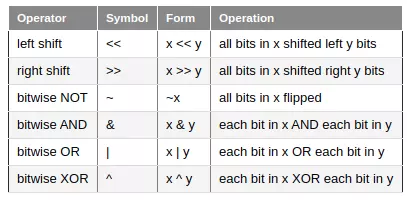
image source: HuuNV on viblo
#include <stdio.h>

int main() {
    unsigned int flags = 5;  // Hệ nhị phân: 0101
    unsigned int mask = 1;   // Hệ nhị phân: 0001

    // MASKING: use AND (&) to hide/clean bit.
    // ex: is the last bit 1
    unsigned int is_bit_set = flags & mask;  // 0001 means 1

    // SHIFTING: move bit Left/Right
    // move to the Left 1 bit (x2): 0101 -> 1010 (10 hệ thập phân)
    unsigned int shift_left = flags << 1;

    // move to the Right 1 bit (/2): 0101 -> 0010 (2 hệ thập phân)
    unsigned int shift_right = flags >> 1;

    printf("Mask: %d, Shift Left: %d\n", is_bit_set, shift_left);
    return 0;
}
Output
Mask: 1, Shift Left: 10
Increment, Decrement & Assignment Operators
- C provides
++(add 1) and--(subtract 1). - Prefix (
++n): increment first, then use the value. Postfix (n++): use the current value, then increment. - Assignment operators like
+=or*=make code more readable (e.g.,i += 2instead ofi = i + 2).
#include <stdio.h>

int main() {
    int n = 5;
    int x = n++; // x gets 5, then n becomes 6

    int m = 5;
    int y = ++m; // m becomes 6, then y gets 6

    printf("Postfix (n++): x = %d, n = %d\n", x, n);
    printf("Prefix (++m): y = %d, m = %d\n", y, m);
    return 0;
}
Output
Postfix (n++): x = 5, n = 6
Prefix (++m): y = 6, m = 6
Conditional Expressions (Ternary Operator)
e1 ? e2 : e3is a shorthand forif-else.- If
e1is true (non-zero), it returnse2, otherwise it returnse3. It helps write much shorter and cleaner code.
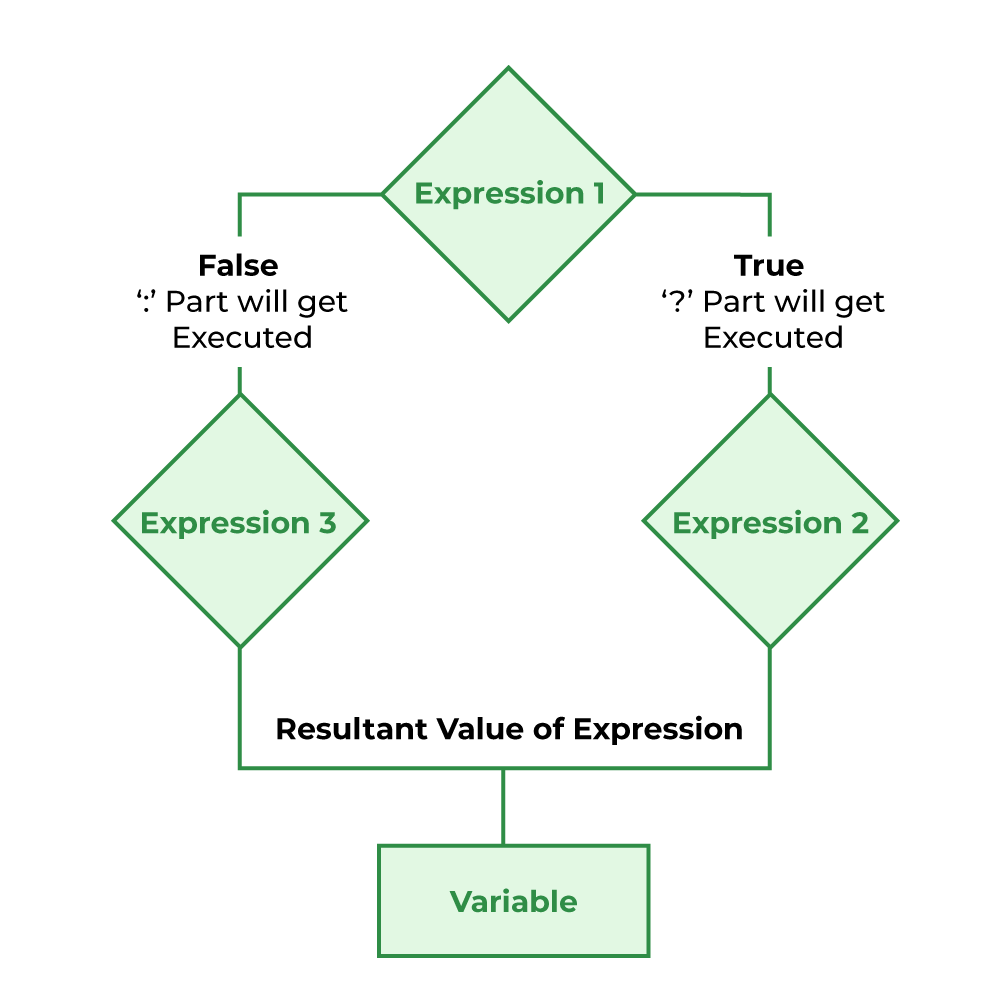
image source: GeeksforGeeks
#include <stdio.h>

int main() {
    int a = 10, b = 20;

    // Get the maximum value using conditional expression
    int max = (a > b) ? a : b;

    printf("Max value is: %d\n", max);
    return 0;
}
Output
Max value is: 20
C: NUMBER BASES AND DATA REPRESENTATION
Why Base 8 (Octal) & Base 16 (Hexadecimal)?
- decimal (base 10) is natural for humans (e.g., "I want 42 pizzas").
- base 8 and base 16 are much better at representing raw binary data in memory.
- base 8 lines up perfectly with base 2 (3 binary digits = 1 octal digit).
- base 16 is denser and widely used now (4 binary digits = 1 hex digit). Digits go from 0-9, then A-F (where A=10, ..., F=15).
Representing Bases & Strings in C
- In C, you can declare numbers directly in different bases using prefixes:
0for Octal, and0xfor Hexadecimal. - Characters vs Strings:
'x'(single quotes) is a single integer representing the numeric ASCII value of that character."x"(double quotes) is an array of characters containing 'x' AND a hidden null terminator\0at the end to mark the end of the string.
#include <stdio.h>

int main() {
    int dec_num = 42;       // Base 10
    int oct_num = 052;      // Base 8 (Prefix '0') -> 5*8 + 2*1 = 42
    int hex_num = 0x2A;     // Base 16 (Prefix '0x') -> 2*16 + 10 = 42

    printf("Decimal (Base 10): %d\n", dec_num);
    printf("Octal (Base 8)   : %o\n", oct_num);
    printf("Hex (Base 16)    : %X\n", hex_num);

    return 0;
}
Output
Decimal (Base 10): 42
Octal (Base 8)   : 52
Hex (Base 16)    : 2A
How Conversion Works Under the Hood (Modulo & Division)
- To convert a number from base 10 to another base (like 16), we use Modulo (
%) to get the remainder (the rightmost digit) and Integer Division (/) to "chop off" that digit and move to the next. - Let's trace how
1234converts to Hexadecimal (4D2).
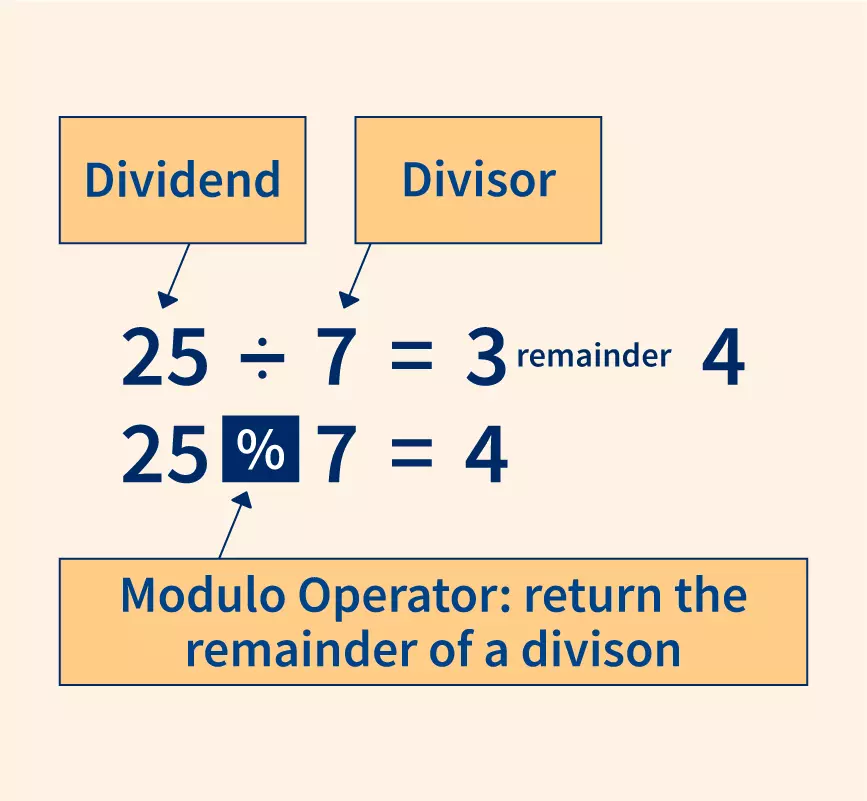
image source: scaler.com
#include <stdio.h>

int main() {
    int num = 1234;

    // Step 1: Lấy chữ số cuối cùng
    int digit_1 = num % 16;  // 1234 % 16 = 2
    num = num / 16;          // 1234 / 16 = 77 (bị truncate phần thập phân)

    // Step 2: Lấy chữ số tiếp theo
    int digit_2 = num % 16;  // 77 % 16 = 13 (Tương đương chữ 'D' trong Hex)
    num = num / 16;          // 77 / 16 = 4

    // Step 3: Lấy chữ số đầu tiên
    int digit_3 = num % 16;  // 4 % 16 = 4

    printf("Hexadecimal of 1234 (reading bottom-up): %X %X %d\n", digit_3, digit_2, digit_1);

    return 0;
}
Output
Hexadecimal of 1234 (reading bottom-up): 4 D 2
Real-world Example: The ASCII Chart
- in the old days, devs had to be deeply aware of the real bits inside the computer.
- e.g. the character
'A'is stored as raw bits, which can be viewed in any base.
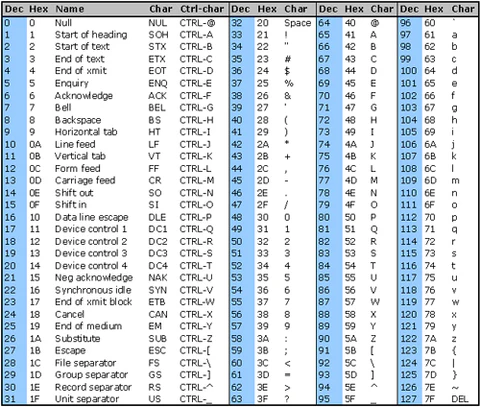
image source: CommFront
#include <stdio.h>

int main() {
    char letter = 'A';

    printf("Letter '%c' in Decimal: %d\n", letter, letter);
    printf("Letter '%c' in Hex    : %X\n", letter, letter);
    printf("Letter '%c' in Octal  : %o\n", letter, letter);

    return 0;
}
Output
Letter 'A' in Decimal: 65
Letter 'A' in Hex    : 41
Letter 'A' in Octal  : 101
C: BYTE ADDRESSING, MASKING AND ENDIANNESS
Word-Oriented vs. Byte-Oriented Computers
- in the old days (e.g., CDC-6500 in the 70s), computers were "word-oriented". The hardware couldn't load a single character, it could only load a massive 60-bit "word" filled with packed characters.
- the B language (C's precursor) was also word-oriented.
- C was highly innovative because it became a "byte-oriented" (byte-addressable) language, giving us character arrays (
string[4]) so we didn't have to extract characters by hand anymore.
The Pain of Masking and Shifting (The Old Way)
- before C's array syntax, to find the 5th character (like 'O' in "HELLO"), you had to:
- create a Mask (0s where you want to ignore, 1s where you want to copy).
- run the word through the mask (Bitwise AND).
- shift the remaining bits all the way down (Bitwise Right Shift) just to check if it equals 'O'.
- C included powerful masking and shifting features (
&,<<,>>) specifically so old-school programmers would respect and actually use the language.
Endianness (Big-Endian vs. Little-Endian)
- when loading words into memory, which byte comes first?
- Big-endian: most significant digits first (makes the most sense to human software developers).
- Little-endian: least significant digits first. Intel chose this because it allowed the CPU to start math addition while it was still loading the higher bytes, making microprocessors faster. We are still stuck with this today.
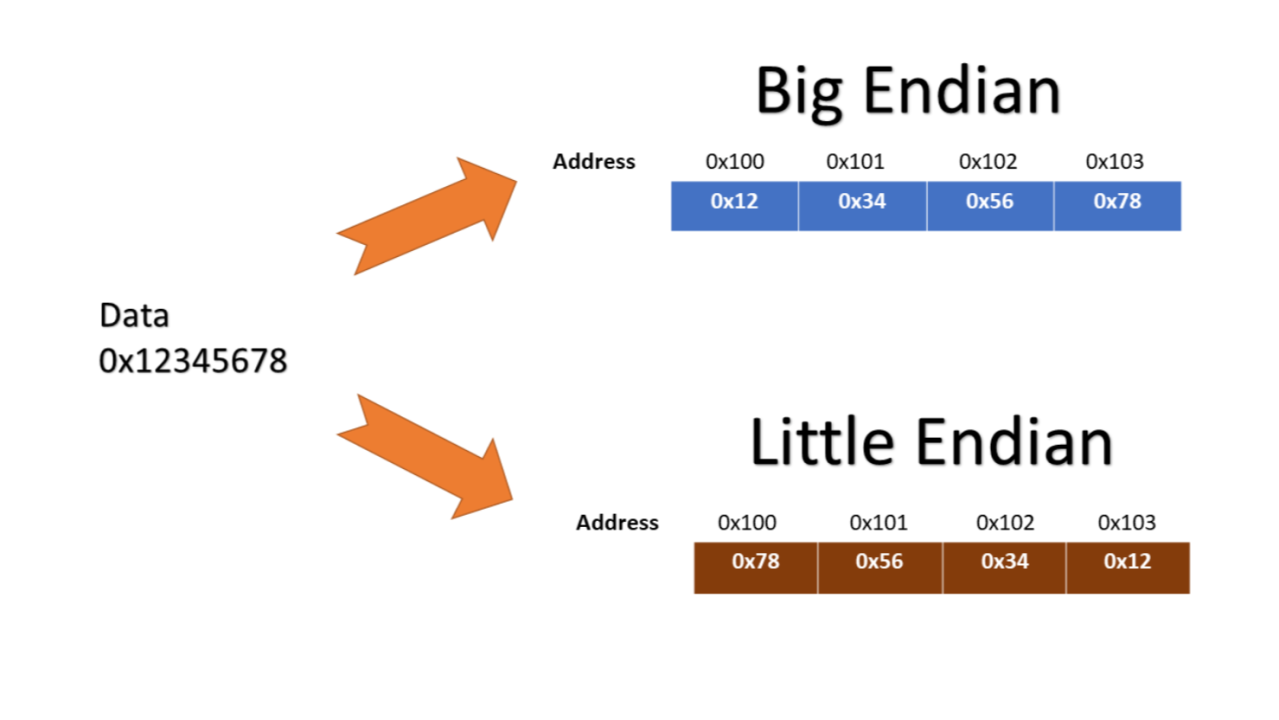
Simulating the Old Way: Extracting a Char via Pointers & Masking
- the code below shows how you would extract the letter 'e' from "hello world" if you treated it as a 32-bit integer word on a Little-Endian computer (instead of a simple char array).
- note: casting a char array to an int array will be covered deeper in Chapter 5 (Pointers).
#include <stdio.h>

int main() {
    // 12 bytes allocated: "hello world" + null terminator
    char s[] = "hello world";

    // pretend the character array is an integer array (loading a 32-bit word)
    int *si = (int *)s;

    // in Little-Endian, the string "hell" is stored backward in the 32-bit int.
    // 'h' is the lowest byte, 'e' is the second byte.

    // create a mask for the second byte: 0xFF shifted left by 8 bits (0x0000FF00)
    int mask = 0xFF << 8;

    // #1 apply mask (*si & mask) to isolate 'e'
    // #2 shift right (>> 8) to push 'e' down to the bottom so we can read it
    int extracted_char = (*si & mask) >> 8;

    printf("Array syntax: %c\n", s[1]); // The easy C way
    printf("Mask & Shift: %c\n", extracted_char); // The painful old way

    return 0;
}
Output
Array syntax: e
Mask & Shift: e